


In this article
The blank canvas is often the most difficult part of the creative process.
A capable model helps you move past that blank canvas — the Kling AI model can generate cinematic, physics-aware video from just a short description.
Even with powerful tools at your disposal, knowing exactly how to phrase a complex idea can be a challenge. This is why the Explore Tab on Pixara AI remains one of our most valuable resources. It’s a living library of logic, style, and community intelligence designed to make you a better creator.
The Open Source of Imagination
For many users, the Explore Tab is simply a place to admire beautiful work. But for power users, it’s a database of solutions. We believe that creativity accelerates when knowledge is transparent. When you click on an artwork in the feed, you gain access to the recipe behind the image.
- See the exact words, styling keywords, and negative prompts that constructed the scene.
- Check which model (e.g., Nano Banana Pro, Flux, Ideogram) and which specific settings (seed number, guidance scale) were used.
This transparency transforms the feed into a learning tool. You can stop guessing how someone achieved a specific lighting effect or texture and simply look at the blueprint they provided.
The Remix Advantage

Why start from zero when you can start from excellence? The Explore Tab is the foundation of the Remix workflow. If you find an image that captures 80% of what you need, perhaps the perfect lighting composition or a specific camera angle, you can use it as your starting point.
By clicking Try this Prompt or Remix, you load that successful formula into your own generator.
You can automate that loop entirely with the Pixara MCP integration, letting an AI agent trigger those generators for you.
From there, you can swap the subject, change the colors, or adjust the aspect ratio. This allows you to iterate on proven concepts rather than struggling to build a complex prompt structure from scratch.
Trend Scouting and Style Discovery
The Pixara community is global and incredibly diverse. The Explore feed is the best way to keep your finger on the pulse of visual trends.
- You might come looking for photorealism but discover a Synthwave Noir or Digital Oil Painting style that perfectly fits your next project.
- The Explore Tab is the ultimate showroom. You can compare how different models handle similar subjects side-by-side.
- A great model to test there is the Google Veo 3 model, known for high visual fidelity and native audio generation.
- A great model to add to that comparison is the Luma Ray 2 video model, known for its natural motion and atmospheric lighting.
- See how Nano Banana Pro handles complex physics compared to how Flux handles artistic abstraction, helping you choose the right engine for your specific goal.
Curated Excellence
Our editors and algorithms work constantly to surface the highest quality generations. These collections are often thematic, highlighting seasonal events, specific color palettes, or emerging genres. Browsing these curated sections can break you out of a creative rut and push you to try techniques you might never have considered.
Your Daily Source of Inspiration
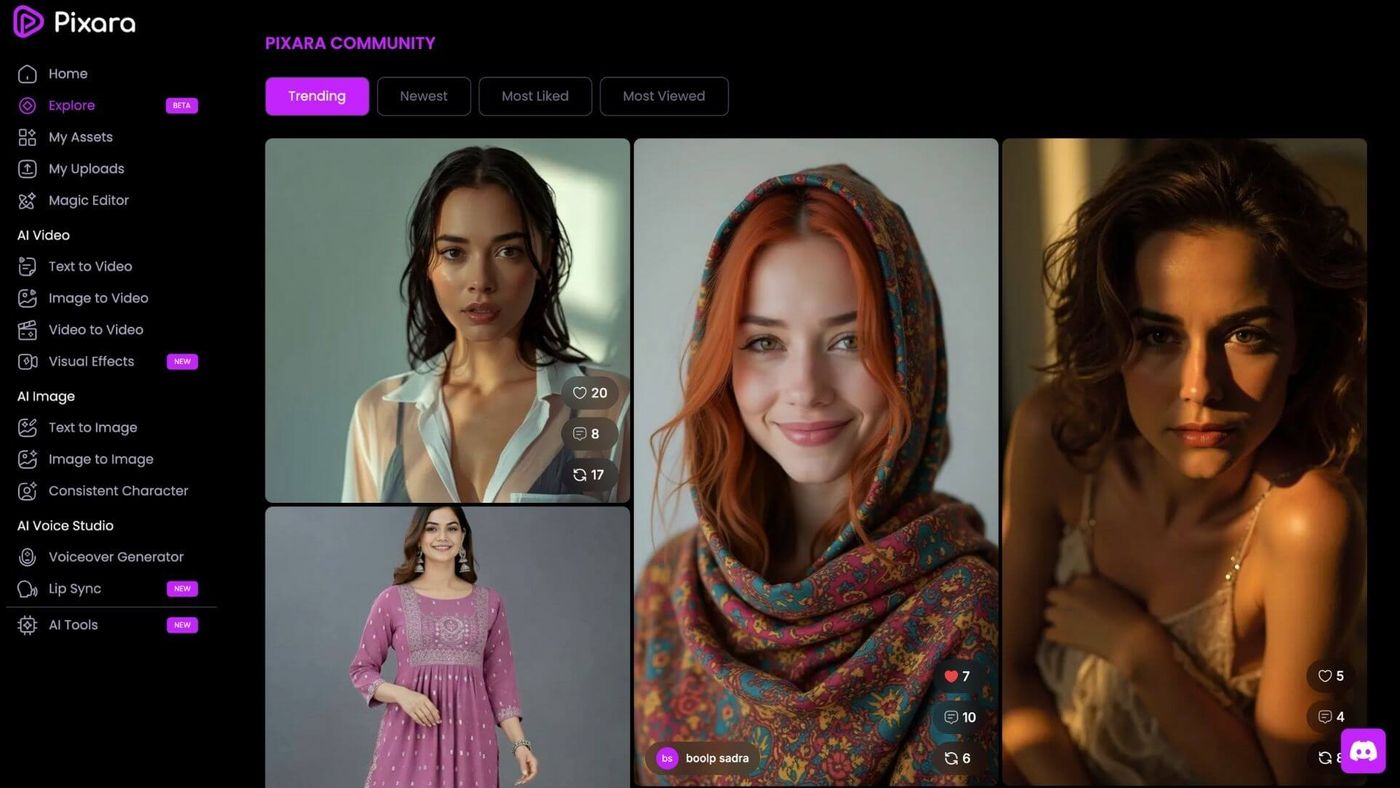
The Explore Tab is designed to be your launchpad. From that launchpad, a natural next step is Google Veo 3 Flow, where you can direct scenes, add native audio, and refine prompts with Pixara's Ara copilot.
It serves as the bridge between a vague idea and a finished masterpiece. Once you have mastered the basics, the next step is scaling them into a system; see the AI creative studios built for scalable ad production.
A great model to try in that showroom is the Veo 3 Fast video model, which prioritizes fast render times while keeping motion smooth.
Ready to dive back in? The gallery is updating every minute with new creations. Visit the Explore tab now to see what the community is building with Nano Banana Pro and our other powerful engines.
Every model in this article, one credit balance
Every Pixara plan includes every model. See the credit cost before each generation and switch models without switching tools.
One click tells Google you prefer Pixara's coverage of AI video and image tools.

Shahzeb Khalid
Shahzeb Khalid is the founder of Pixara, a technology entrepreneur, product strategist, and AI enthusiast focused on building innovative digital products that empower creators and businesses. With a mission to transform industries through thoughtful design and emerging technologies, he works at the intersection of artificial intelligence, product development, and business growth.
More from ShahzebKeep reading
 How-to
Where to Sell AI-Generated Images Online: 9 Platforms
Turn AI artwork into income with these 9 selling platforms. Explore digital downloads, stock licensing, print-on-demand, and online stores.
 How-to
Kling AI Commercial Use: What Each Plan Allows in 2026
Can you use Kling AI videos commercially? Explore 2026 plan permissions, subscription costs, credit limits, and licensing restrictions.
 How-to
How to Use Stable Diffusion XL For The Best Possible Realistic Details
A practical Stable Diffusion XL guide covering setup, prompting, seeds, sampling, CFG, LoRAs, ControlNet, inpainting, outpainting, and ComfyUI.