


In this article
Creating a character is easy, but keeping that character the same across ten different scenes used to be impossible. Seedance 2.0's spatial consistency supports the same goal across motion; see the real-world applications of Seedance 2.0 for video and animation.
If you've ever tried to make an AI influencer or a comic book hero, you know the pain. One minute they have blue eyes, the next minute they are a different person entirely.
Pixara has solved this problem with the new Consistent Character workflow.
This feature allows you to upload a reference image and generate infinite new variations of that same person. They can change clothes, visit new locations, or show different emotions, but their face and identity remain locked. Keeping that consistency across a whole project is easier when your process is systematized — see our guide to AI workflow automation for design teams.
You now have access to two powerful models inside this dashboard: Pixara Aura and Ideogram Character.
Pixara Aura
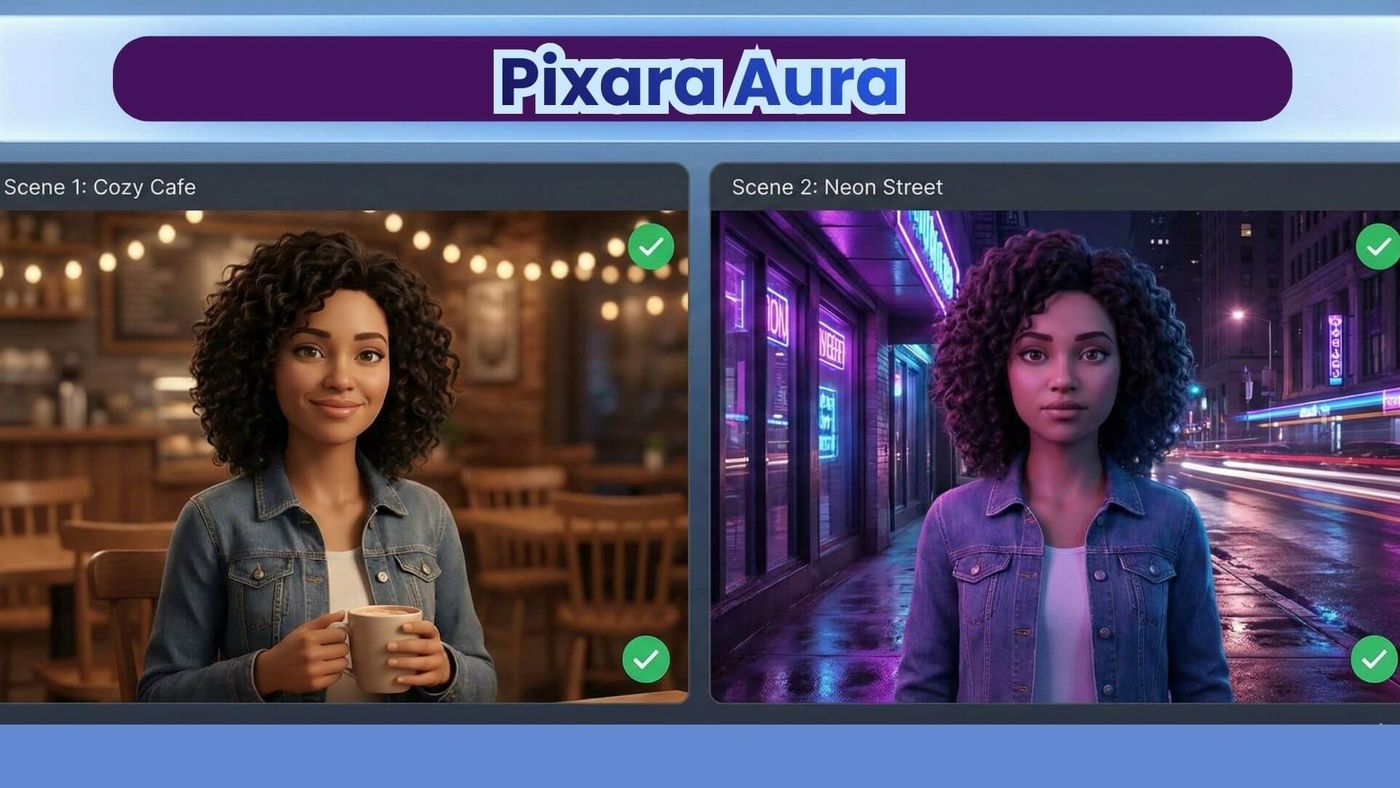
Pixara Aura is built for creators who need stability above all else. This model excels at locking facial features while allowing for natural changes in lighting and pose.
If you're building a virtual influencer or a recurring character for a brand, Aura is your best starting point. It understands that a character is more than just a face shape. It preserves the vibe of the person. When you move your character from a coffee shop to a neon-lit street, it ensures they look like they actually belong in the new environment, rather than just being pasted on top. For the marketing side of that choice, read this look at AI-powered virtual influencers and the questions brands face when using them.
Ideogram Character
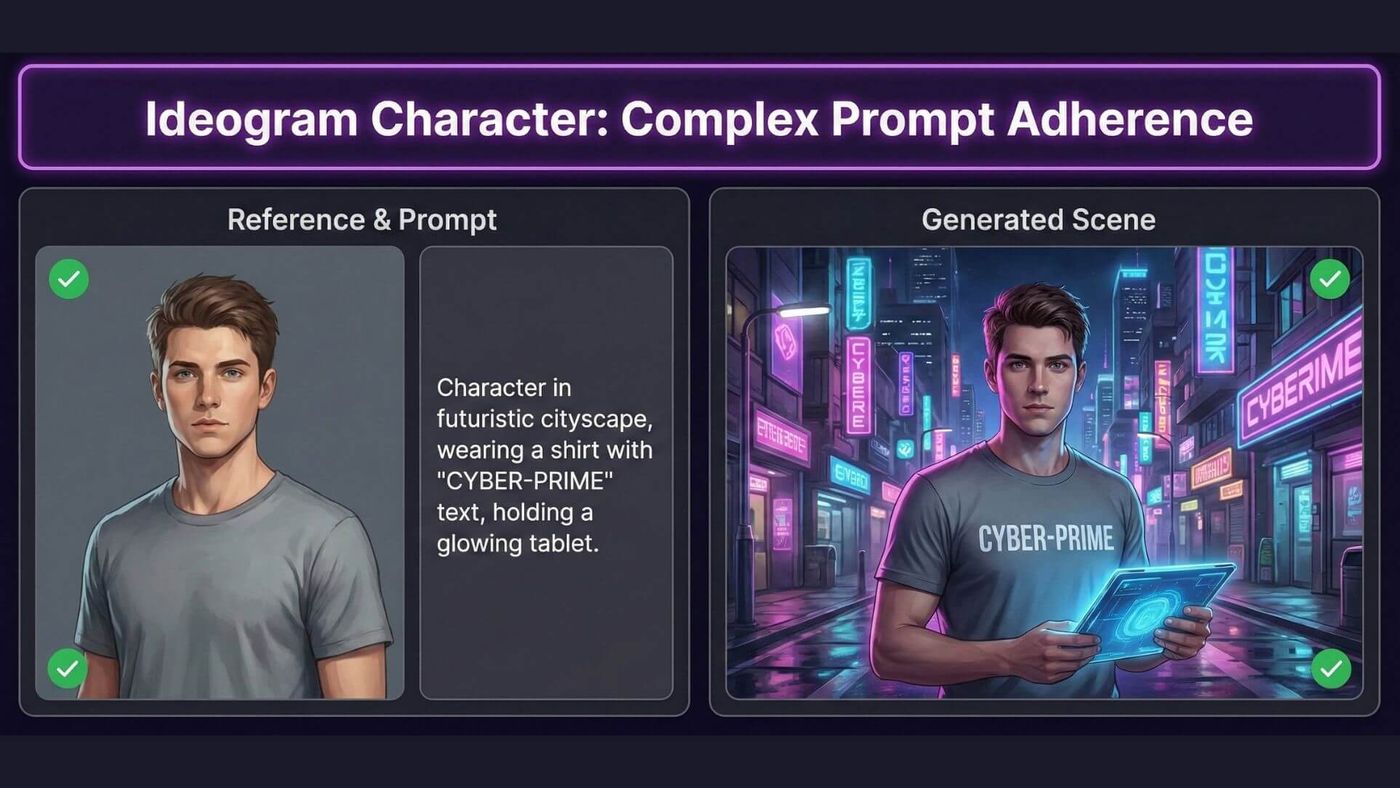
The second model available to you is Ideogram Character. This engine is famous for its incredible adherence to complex prompts.
Ideogram Character is the right choice when your scene requires specific details. If you need your character to wear a shirt with specific text written on it, or if you need them to hold a sign, this model handles those requests perfectly. It's also exceptional at artistic stylization, as you can take a photorealistic reference and generate consistent illustrations, 3D renders, or sketches without losing the identity of the original subject.
How to Choose the Right Model
Having both models gives you a massive advantage.
- Use Pixara Aura when you need photorealistic consistency for social media, fashion showcases, or cinematic storytelling.
- Use Ideogram Character when you need complex compositions, text integration, or specific artistic styles.
Start Creating Today
The days of rerolling prompts hoping for a lucky match are over. You can now build entire narratives around a single consistent identity.
Head over to the dashboard and try Pixara Consistent Character now. Your stories deserve a leading star that actually looks like the same person in every frame.
Every model in this article, one credit balance
Every Pixara plan includes every model. See the credit cost before each generation and switch models without switching tools.
One click tells Google you prefer Pixara's coverage of AI video and image tools.

Hamza Ijaz
Hamza Ijaz is a full-stack software engineer with a passion for building scalable web applications, SaaS platforms, and AI-powered products. He has experience working across the development stack, helping businesses transform ideas into reliable digital solutions. Recent highlights include developing high-performance applications, implementing modern software architectures, and contributing to innovative technology initiatives.
More from HamzaKeep reading
 News & ideas
Best All-in-One AI Creative Platforms for Image and Video in 2026
Find the best AI creative platform for your workflow. Compare Pixara, Adobe Firefly, Canva, Midjourney, Runway, and more.
 News & ideas
Best AI Text to Video Generators in 2026: 9 Tested
Which AI video generator should you choose? Explore 9 platforms with detailed feature comparisons, pricing, pros, cons, and recommendations.
 News & ideas
7 Best AI Lip Sync Tools in 2026 (Video, Photo & Dubbing Tested)
Looking for realistic AI lip sync? Compare some of the best tools for avatar videos, multilingual dubbing, talking photos, and automated video production.