
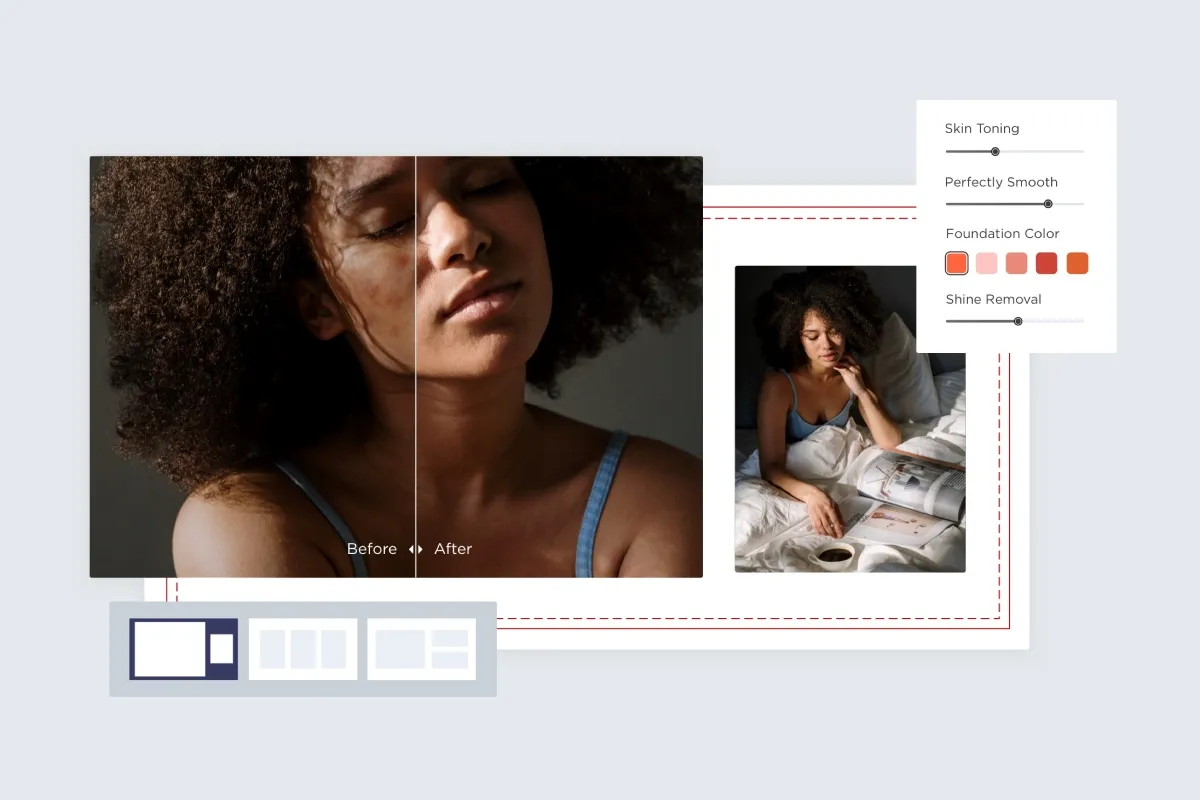
Pixelcut (formerly Pixa) earned its following as a fast, mobile-first AI photo editor built for online sellers — one-tap background removal, a magic object eraser, AI product backgrounds, batch editing, and upscaling, all from your phone. It's a great tool. But it isn't the only one, and it isn't the best one for every workflow.
Maybe you want more accurate edge detection for tricky products like jewelry or hair. Maybe you need a genuine free tier, a desktop workflow, an API to process a whole catalog, or design tools to turn a cutout into a finished ad. Maybe you want to generate on-brand product imagery and video with AI, not just clean up photos. Whatever the reason, there's a Pixelcut alternative built for exactly that job.
Also Read:
- 10 Best Picsart Alternatives in 2026
- 9 DeeVid Alternatives in 2026: The Ultimate Guide to AI Video Translation and Dubbing
- 10 Best Morphic Alternatives in 2026
- 9 Best Pixlr Alternative in 2026
Below are the ten best options in 2026 — an AI background remover app for some, a full product photo editing app for others, and an AI creation suite for the most ambitious — with what each does best, roughly what it costs, and who should pick it. We've put a quick comparison table first, then full breakdowns, a Pixelcut vs. Remove.bg verdict, free picks, and an e-commerce section for Shopify and Amazon sellers.
What to Look for in a Pixelcut Alternative
Four things separate these tools. Knowing which matters to you makes the pick obvious:
- Cutout accuracy — how cleanly it handles hard edges (hair, fur, transparent glass, jewelry). This is the single biggest quality differentiator.
- Beyond background removal — do you also need an object/people eraser, AI-generated backgrounds and scenes, retouching, upscaling, design templates, or full AI image/video generation?
- Platform and scale — a native mobile app for shooting-and-editing on the go, a desktop workspace, or an API/batch pipeline for hundreds of SKUs.
- Price and free tier — genuinely free usage, watermark rules, per-image credits vs. flat subscriptions, and commercial-use rights.
Here are the ten best, ranked for the typical searcher: a mobile e-commerce seller who wants clean cutouts and finished product images fast.
1. Photoroom — Best Overall Pixelcut Alternative

Photoroom is the most direct, most complete alternative to Pixelcut, and for most sellers it's the one to try first. It pairs excellent AI background removal with a deep library of scene templates, AI-generated backgrounds, batch processing, retouching, and a brand kit — on both a polished mobile app and web.
Key features: Accurate one-tap background remover, AI product staging and background generation, an object/retouch tool to erase unwanted elements, batch editing for many images at once, hundreds of e-commerce and social templates, brand colors/fonts, and an API for automated pipelines.
Pricing: Free tier (limited exports, watermark on some features); Pro around $9.99/month; Business/team tiers around $29.99/month. A free trial is available.
Pros: The closest match to Pixelcut's workflow with a larger template library, strong mobile and web experience, batch and API for scaling. Cons: The best features sit behind Pro, and the business tier gets pricey for large teams.
Best for: Mobile and multi-channel e-commerce sellers who want Pixelcut's exact workflow with more templates, AI backgrounds, and scalability.
2. Pixara.ai — Best AI Image + Video Creation Suite

If Pixelcut brought you in for AI-powered editing but you increasingly want to create product imagery and video — not just clean up photos — Pixara.ai is the standout upgrade. It's a one-stop AI content creation platform that brings together the best image and video models, AI voiceovers, and a built-in editor, so you can go from a text prompt or a single product photo to polished, on-brand visuals in one place.
That makes Pixara a powerful Pixelcut alternative for sellers and marketers who've outgrown simple background swaps and want generative product photography, lifestyle scenes, and even short product videos without hiring a studio.
Key features:
- A full set of AI image-editing tools that overlap directly with Pixelcut — AI background removal, text/object removal, AI upscaling for crisp high-res product shots, AI outpainting to expand and reframe images, professional headshot generation, and artistic filters.
- Text-to-image and image-to-video generation — turn a product description or a still photo into fresh imagery or motion.
- 30+ leading AI models in one dashboard, including top image models like Google Nano Banana Pro, Midjourney, FLUX, Ideogram V3, and Recraft V3, plus video engines such as Seedance 2.0, Sora 2, Kling 3.0, and Google Veo 3.1 — so you're never limited to one model's strengths.
- Consistent character/product generation across multiple frames — useful for branded, repeatable visuals.
- AI voiceovers and an online editor built in, so generation, editing, and audio live together.
Pricing: Pixara offers affordable subscription and credit-based tiers plus a free trial to test the models, and frequently runs promotional discounts. Because credit costs vary by model, check pixara.ai for current pricing.
Pros: Goes far beyond background removal into full AI image and video creation; many premium models under one affordable subscription; a genuine concept-to-creation workflow with editing and voiceover included.
Cons: It's a broad AI creation suite rather than a purpose-built mobile product-photo app, so for quick, single-tap catalog cutouts a specialist like Photoroom or Remove.bg can be faster.
Best for: Sellers, marketers, and creators who want to generate original product imagery, lifestyle scenes, and video with the newest AI models — with background removal, object erasing, upscaling, and editing all included.
3. Remove.bg — Best Dedicated AI Background Remover

If cutout accuracy is all you care about, Remove.bg remains the benchmark. It does one thing — remove backgrounds — and does it about as well as anything on the market, with edge detection that handles hair and fine detail impressively. It's also the go-to when you need an API to plug background removal into your own catalog pipeline.
Key features: Best-in-class edge/hair detection, instant one-click removal, a robust REST API, bulk processing, and integrations with design tools and e-commerce platforms.
Pricing: Free with 50 low-res previews per month; full-resolution downloads via credits (from roughly $0.12–$0.20 per image at volume) or subscription bundles; API pricing scales with usage.
Pros: Among the most accurate cutouts available, excellent API for developers, scalable credit system.
Cons: No design tools, object eraser, or AI backgrounds — it's a specialist, not an all-in-one — and full-res output requires paying.
Best for: Sellers and developers who want the cleanest possible cutouts, or who need background removal built into an automated catalog workflow via API.
4. Canva — Best for Turning Product Photos Into Marketing Assets

Canva isn't a product-photo specialist, but it's the best pick if your real goal is turning a product shot into finished marketing — ads, social posts, banners, thumbnails. Its background remover is one click, and it sits inside the world's most popular design platform.
Key features: One-click Background Remover and Magic Eraser (object removal), a massive template library, Magic Resize to reformat one design for every channel, Brand Kit, AI image tools, and team collaboration.
Pricing: Free plan (background remover requires Pro); Canva Pro around $14.99/month.
Pros: Consolidates photo cleanup and full marketing-asset creation in one tool, huge template ecosystem, easy for non-designers.
Cons: Background removal and Magic Eraser require Pro, cutout accuracy trails dedicated removers on tricky edges, and it processes one image at a time.
Best for: Sellers and marketers who want to remove a background and immediately design the finished ad or listing graphic without switching apps.
5. Picsart — Best All-in-One Mobile Photo Editor

Picsart is the closest to Pixelcut in spirit: a powerful, playful, mobile-first editor loaded with AI tools. It's ideal if you want a background remover and an object eraser and effects, filters, and AI generation in one app.
Key features: AI background remover, object/people remover (retouch), AI backgrounds and effects, thousands of templates and stickers, batch editing, AI image generation, and a large creator community. Strong iOS and Android apps.
Pricing: Generous free tier; Picsart Plus/Pro roughly $5–$13/month depending on plan and billing.
Pros: Enormous toolkit for the price, excellent mobile UX, both background remover and object eraser included, fun for social content.
Cons: So many features can feel cluttered for a pure product-photo workflow, and cutout precision is good but not quite Remove.bg-level on the hardest edges.
Best for: Mobile creators and sellers who want an affordable, do-everything AI photo editing app with a background remover and object eraser built in.
6. Adobe Express — Best Free Design + Firefly AI

Adobe Express brings Adobe's Firefly AI and a clean design surface to a generous free plan. It's a strong Pixelcut alternative for anyone who wants trustworthy AI editing plus design, without a steep Photoshop learning curve.
Key features: One-tap background removal, Firefly-powered generative fill and object removal, generate-background and text-to-image, templates for social and commerce, and quick resizing — on web and mobile, with tight ties to the wider Adobe ecosystem.
Pricing: Capable free plan; Premium around $9.99/month unlocks the full feature set and asset library.
Pros: Reliable AI from Adobe, strong free tier, background removal plus generative object removal, commercially safer AI generation.
Cons: Less specialized for high-volume product catalogs, and power users may still want full Photoshop for edge cases.
Best for: Budget-conscious sellers and creators who want free, dependable background removal and design with Adobe's AI behind it.
7. PicWish — Best for High-Volume and Free Removal

PicWish is built for throughput. Its free tier is far more generous than Pixelcut's, and it's designed to clear large batches of product images quickly, making it a favorite for sellers processing many SKUs on a budget.
Key features: Fast AI background removal, batch/bulk processing, an object eraser and photo enhancer, an API for automation, and web plus mobile apps.
Pricing: Free tier (around 30 images/day, compressed resolution); paid plans from roughly $9.99/month for full-res and higher volume; API credits available.
Pros: Very high free daily limit, strong batch tools, fast, affordable paid tiers.
Cons: Free output is compressed, and the design/template side is thinner than Photoroom or Canva.
Best for: Sellers who need to remove backgrounds from lots of product photos cheaply, with batch processing and a big free allowance.
8. Cutout.Pro — Best All-in-One AI Photo Toolkit

Cutout.Pro packs a wide range of AI photo utilities into one platform, making it a versatile Pixelcut replacement for individual sellers and small teams who want many tools without many subscriptions.
Key features: Background removal, object/people eraser, photo enhancer and upscaler, AI product backgrounds, passport-photo and headshot tools, video background removal, bulk processing, and an API.
Pricing: Credit-based, with subscriptions starting around $5–$9/month; API pricing available.
Pros: Broad toolkit (photo and video), bulk processing, flexible credit or subscription options. Cons: Credit costs can add up with heavy use, and the UI is more utilitarian than the polished mobile apps.
Best for: Individual sellers and small businesses who want an affordable, all-in-one AI editing toolkit beyond just background removal.
9. Pebblely — Best AI Product Background Generator

Where most tools remove backgrounds, Pebblely specializes in creating beautiful, realistic ones. Upload a product, and it generates professional lifestyle and studio scenes around it — perfect for making DIY product shots look agency-made.
Key features: AI-generated product backgrounds and scenes, automatic background removal as the first step, themed scene presets (kitchen, nature, studio, seasonal), batch generation, and an API for stores.
Pricing: Free trial images to start; paid plans around $19/month for higher volume.
Pros: Outstanding at realistic AI product photography, huge time-saver versus staging real shoots, great for lifestyle imagery.
Cons: Focused on background generation rather than being a full editor, so you may pair it with a remover/design tool.
Best for: E-commerce sellers who want studio-quality AI product backgrounds and lifestyle scenes without a photographer.
10. Claid.ai — Best for E-commerce Catalogs at Scale

Claid.ai is engineered for retailers and marketplaces standardizing thousands of product images. It combines background removal with automatic enhancement, resizing, and AI-generated backgrounds, all available via a powerful API.
Key features: Automatic image enhancement and standardization, background removal and replacement, AI product photography and custom environments, bulk processing, and deep API/integration support for catalog automation.
Pricing: Plans from roughly $9–$19/month for creators, scaling to usage-based API pricing for enterprises; free trial available.
Pros: Built for consistency across large catalogs, excellent enhancement and standardization, strong API.
Cons: More platform than casual app — overkill for a seller with a handful of products, and the value shows mainly at scale.
Best for: Shopify, Amazon, and marketplace sellers standardizing and enhancing large product catalogs automatically.
Pixelcut vs. Remove.bg: Which Is Better for Product Photo Editing?
This is the comparison people search for most, so here's the straight answer. Remove.bg is better if you only need the cutout — its edge detection on hair, fur, and fine detail is among the most accurate available, and its API is the cleanest way to automate background removal across a catalog. Pixelcut is better if you need the whole workflow — background removal plus AI backgrounds, an object eraser, batch editing, and design, all in a mobile app.
Put simply: Remove.bg is a precision tool; Pixelcut (and Photoroom) are workflows. If your bottleneck is accurate cutouts feeding into your own system, choose Remove.bg. If you want to go from raw phone photo to finished, listing-ready image in one app, choose Pixelcut — or Photoroom, which offers Remove.bg-class removal and the full editing suite. And if you want to generate new product visuals and video rather than only edit existing ones, Pixara.ai is the one to add.
Free AI Background Remover Apps Like Pixelcut (Mobile)
Want free background removal on your phone? Several picks above have strong free tiers:
- PicWish — the most generous free volume (around 30 images/day), great for batches.
- Adobe Express — a genuinely capable free plan with Firefly AI.
- Canva — free to use overall (background remover needs Pro), best if you also design.
- Picsart — a free tier covering background removal and object erasing on mobile.
- Pixara.ai — a free trial to test AI background removal alongside its generation tools.
For zero-cost, no-frills removal, Remove.bg's free previews and the free tiers of PicWish and Picsart will cover most casual needs; upgrade only when you hit resolution or volume limits.
Best Pixelcut Alternatives for Shopify and Amazon Product Photography
Selling on marketplaces adds requirements — pure-white backgrounds for Amazon, consistent sizing, and lifestyle shots for ads. The strongest picks here:
- Photoroom — Shopify integration, white-background presets, batch processing, and lifestyle AI backgrounds in one app.
- Claid.ai — automatic standardization and enhancement across a whole catalog via API; ideal for large stores.
- Pebblely — generate scroll-stopping lifestyle and studio scenes for ads and secondary listing images.
- Pixara.ai — generate original product imagery and short product videos for listings and ads with the latest AI models.
- Remove.bg — clean, Amazon-ready white-background cutouts at scale through its API.
Many sellers combine two — for example, Remove.bg or Photoroom for clean cutouts, plus Pebblely or Pixara.ai for lifestyle backgrounds and video.
How to Choose the Right Pixelcut Alternative
- Best overall / most Pixelcut-like: Photoroom.
- AI image + video generation: Pixara.ai.
- Most accurate cutouts / API: Remove.bg.
- Design finished ads and listings: Canva.
- All-in-one mobile editor with object eraser: Picsart.
- Free + trustworthy AI: Adobe Express.
- High-volume free removal: PicWish.
- Versatile budget toolkit: Cutout.Pro.
- AI product backgrounds: Pebblely.
- Catalogs at scale: Claid.ai.
The Bottom Line
There's no single winner — there's the right Pixelcut alternative for your workflow. For most sellers, Photoroom is the best all-around replacement, matching Pixelcut's mobile workflow with more templates, AI backgrounds, and scale. Want to generate original product imagery and video with the newest AI models? Pixara.ai. Need the most accurate cutout or an API? Remove.bg. Want to design finished ads? Canva. Want an affordable do-everything mobile editor with an object eraser? Picsart. Scaling Shopify or Amazon? Claid.ai and Pebblely. Pick your primary need, run a free trial on your own product photos, and you'll find a tool that's faster, cheaper, or more capable than Pixelcut for the job you actually do.